
Introduction:
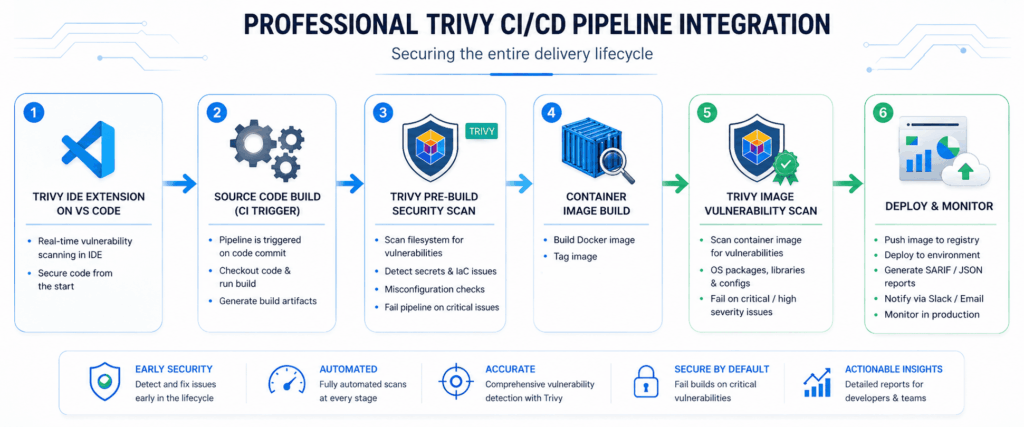
Trivy is all in one security scanner which helps to perform multiple operations like Software Composition Analysis(SCA), Secrets Scanning, finding misconfiguration in IaC(Infrastructure as Code) files. And Container Scanning. Integrating trivy in azure devops platform will be very helpful to fix the security issues before deploying the applications into productions. The complete workflow given below for Azure Devops CI/CD pipeline integration.
Software Composition Analysis (SCA):
Every project use the open source/paid components which is developed by third party vendors/developers. Software Composition Analysis is the process to find the known vulnerabilities into the third party components used into project. Trivy’s one of the scanner named ‘vuln’ helps to find the known vulnerabilities of the third party components.
Use the yaml code below for trivy SCA integration in azure devops.
- task: Docker@2
  displayName: "Run Trivy Scan"
  inputs:
    command: run
    arguments: >
      --rm
      -v $(Build.SourcesDirectory):/src
      -w /src
      aquasec/trivy:latest
      fs
      --scanners vuln
      --severity HIGH,CRITICAL
      --format sarif
      --output trivy.sarif
      .
Secret Scanning:
If an organization doesn’t follow the best security practices across or maybe some sort of emergency scenarios like hot-fix some issues many developers missed the hardcoded secrets/credentials or token like JWT, API keys which causes security incident.
What if a repository is public and OpenAI API Key pushed by mistake to it. As it is having public access so any user can see it and misuse the OpenAI API key. Which may cause the financial losses to the organization as OpenAI comes with billing. To avoid this kind of incident/insecure practices you can configure pre-commit hooks by following the blog post – https://pentestguy.com/shift-left-security-with-pre-commit-hooks/ or can use trivy vs code extension.
Use the below yaml code for integrating trivy in azure devops to enabled the secret detection/scanning into the ci/cd pipeline.
- task: Docker@2
  displayName: "Run Trivy Secret Scan"
  inputs:
    command: run
    arguments: >
      --rm
      -v $(Build.SourcesDirectory):/src
      -w /src
      aquasec/trivy:latest
      fs
      --scanners secret
      --severity HIGH,CRITICAL
      --format sarif
      --output trivy.sarif
      .
Misconfiguration Scanning:
As many configurations like (dockerfile, terraform, kubernetes) developed as per their requirements. It might possible that those configurations has some misconfigurations for example image/container used root user.
Trivy provides the scanner to scan the misconfiguration present into the IaC configuration files. To implement that task into your azure devops pipeline use the below yaml code.
- task: Docker@2
  displayName: "Run Trivy Scan"
  inputs:
    command: run
    arguments: >
      --rm
      -v $(Build.SourcesDirectory):/src
      -w /src
      aquasec/trivy:latest
      fs
      --scanners misconfig
      --severity HIGH,CRITICAL
      --format sarif
      --output trivy.sarif
      .
Note: Combination of scanners like vuln, secret, misconfig will works also give combine results.
Image Security Scanning:
Many applications now a days runs on containers, so it’s very important to have image/container security scanning in the software development lifecycle. Trivy helps to perform image security scanning to find the vulnerabilities of the image, it is always a good security practice to add image security scanning before pushing the image to registry.
To integrate the trivy in azure devops, use the yaml code given below. Make sure to use the variables for the image name, as below example it’s ‘juice-shop’.
- task: Docker@2
  displayName: "Run Trivy Scan"
  inputs:
    command: run
    arguments: >
      --rm
      -v /var/run/docker.sock:/var/run/docker.sock
      -v $(Build.SourcesDirectory):/src
      -w /src
      aquasec/trivy:latest
      image
      --severity HIGH,CRITICAL
      --format sarif
      --output trivy.sarif
      juice-shop
Bonus – Trivy VS Code Extension:
Shifting left security is most important practice should be follow by every organization. Instead of using the paid tools small organizations can use tool like trivy extension into their IDE. As Trivy provide the extension for VS Code IDE completely free which helps to perform the security scans before even push to the repository or while coding. Trivy extension includes the different scanners like Vulnerabilities for third party dependencies used in the project or we can say SCA, misconfigurations in infrastructure configuration files and secrets.
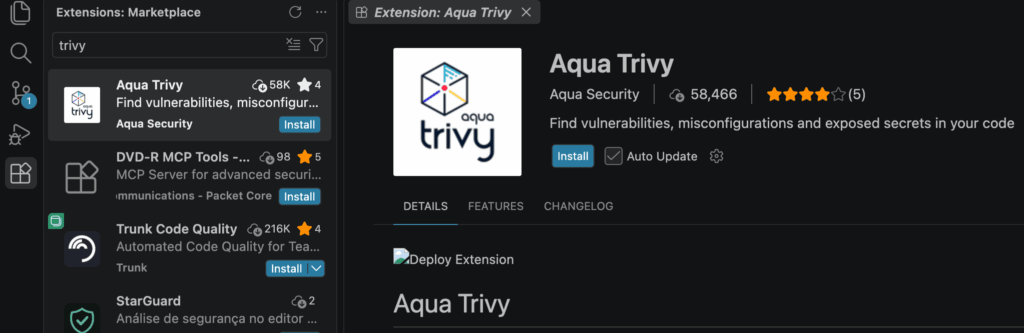
To install Trivy extension in VS Code search it in the plugin/extension tab or follow the link – https://marketplace.visualstudio.com/items?itemName=AquaSecurityOfficial.trivy-vulnerability-scanner
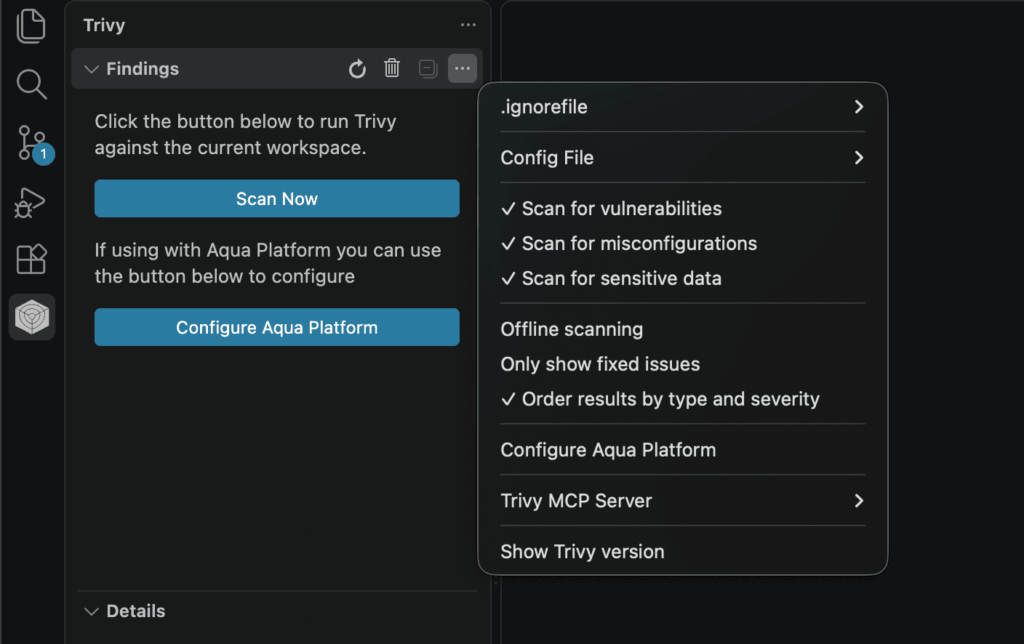
Click on Install Trivy, which will download and install executable version of trivy on your system.
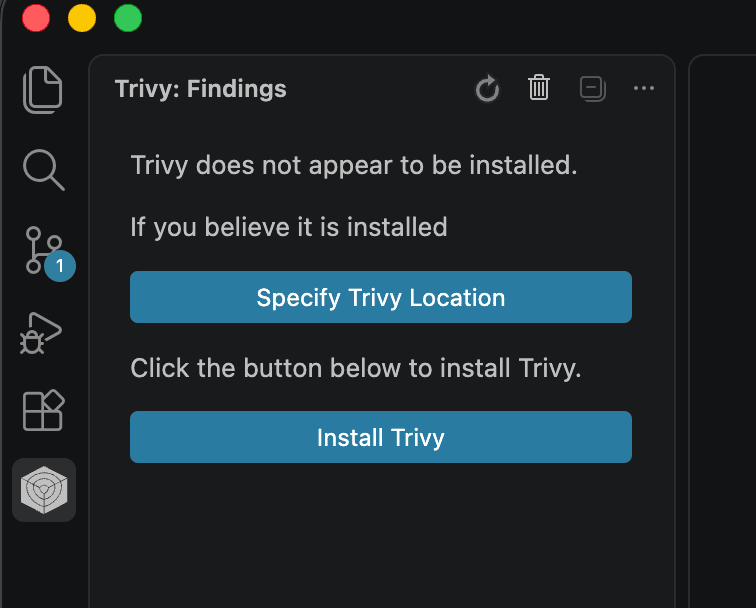
Make sure to enabled all the scanners (vulnerabilities, misconfigurations, sensitive data).
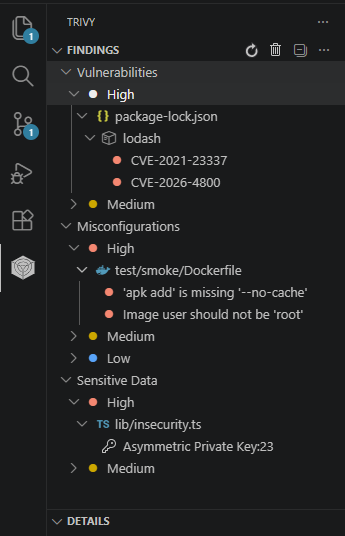
After scanning, get the relevant results/findings with details where developers can fix it before pushing/deploying the code.
Conclusion:
As trivy is huge tool which has other features as well like SBOM and kubernetes related scanning options that we can explorer later. Want to collaborate on real-world testing, tool development, or writing? Reach out via the Collaboration page. Thank you!!

