

Let’s be honest-most security issues don’t happen because developers want to write insecure code. They happen because of speed, pressure, copy-paste habits, or just not knowing better in the moment.
Now imagine this flow:
git commit → instant security feedback → fix → commit safelyWhat are Pre-Commit Hooks?
Pre-Commit are git hooks that run before git commit, which helps to prevent insecure code from entering the repo. It gives fast feedback to the developers.
git commit -> pre-commit hooks -> allow/block commitFree(Community) & Open-Source Tools Used in this demo
Below are the tools we will use – all free, open source, and widely trusted in the security community.
| Tool | Purpose | Category |
|---|---|---|
| pre-commit | Hook framework | Git |
| Semgrep OSS | Code vulnerability detection | SAST |
| Gitleaks | High-confidence secret detection | Secrets |
| Trivy | Secrets & filesystem scan | Secrets / SCA |
| Checkov | IaC security scanning | IaC |
These tools cover code, secrets, dependencies, and IaC, giving us strong baseline protection.
Pre-Commit Configuration
To get started, add a .pre-commit-config.yaml file at the root of your repository.

Below is a working example configuration you can use directly.
repos:
  # ----------------------------
  # Secrets Detection — Gitleaks
  # ----------------------------
  - repo: https://github.com/gitleaks/gitleaks
    rev: v8.30.0         # Latest known release
    hooks:
      - id: gitleaks
        args: ["--staged"]

  # ----------------------------
  # SAST — Semgrep (community)
  # ----------------------------
  - repo: https://github.com/semgrep/pre-commit
    rev: "v1.145.0"       # Latest tag indicated in semgrep docs
    hooks:
      - id: semgrep
        args:
          - "--config=auto"
          - "--error"
        files: \.(py|js|ts|go|java)$

  # ----------------------------
  # IaC Security — Checkov
  # ----------------------------
  - repo: https://github.com/bridgecrewio/checkov.git
    rev: "3.2.495"         # Version from Python package metadata
    hooks:
      - id: checkov
        files: \.(tf|yaml|yml|json|Dockerfile)$
        args:
          - "-d"
          - "."

  # ----------------------------
  # Filesystem & Dependency Scan — Trivy (via mirror)
  # ----------------------------
  - repo: https://github.com/GaukeT/pre-commit-mirrors-trivy
    rev: "v0.66.0"
    hooks:
      - id: trivy-fs
        args:
          - "--exit-code=1"
          - "."
Installing Pre-Commit (One-Time Setup)
Pre-commit requires Python and pip.
Install pre-commit globally:
pip install pre-commit
Then, inside your repository, install the hooks.
pre-commit installIf installed correctly, Git will confirm that pre-commit hooks are active. From now on, every git commit automatically triggers security checks.

Vulnerable Code (For Demo Purposes Only)
Add your code, for demonstration I have added the vulnerable code.

Use the below vulnerable app.py code for testing purposes, not recommending to add it into any real project/repository.
import subprocess

def run_cmd(cmd):
    return subprocess.Popen(cmd, shell=True).communicate()

GITHUB_TOKEN = "ghp_1234567890abcdefghijklmnopqrstuvwxyzABCDE"

user_input = input("Enter command: ")
run_cmd(user_input)
Keep in mind that hooks run only on staged files, staged the files. And all the tools download only once, cached locally. After that commit the code.
git add .
git commit -m "test-pre-commit"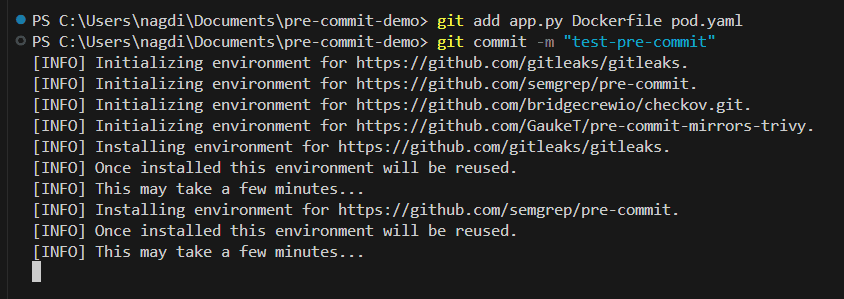
Pre-Commit Results
After committing will get the tools results independently passed or failed. And if it’s failed then try to fixed the issues before committing the code into the repository.

With pre-commit hooks security becomes a developer habit, which doesn’t mean that avoid devsecops solution in the pipeline.
Conclusion
Security doesn’t always need complex platforms or expensive tools. Sometimes, it just needs to show up earlier. If you’re interested in collaborating with me on real-world testing, tool development, or writing together, feel free to reach out via Collaboration page. Thank you!!

